Your birth chart in 3D
Enter your date, time and place of birth and look at your natal chart in three dimensions. Earth at the centre, the zodiac belt around it, the planets exactly where they were when you were born, the AC and MC axes just like on the wheel. Rotate, zoom, tap a planet to see what it means in its sign.
Loading the 3D chart…
Planets in the birth chart
Enter your date, time and place of birth — your planets will appear here with sign, degree and house, and the same chart in 3D above.
What is a 3D birth chart?
A birth chart is a snapshot of the sky at the minute and place you were born. It is usually drawn as a flat wheel: the twelve zodiac signs around the edge, the houses and planet glyphs inside. That wheel is a top-down view of the real sky, flattened so it is easy to read.
In 3D you can see what stands behind the wheel. Earth is at the centre — astrology looks at the sky from here. Around it is the zodiac belt: not a wall in space, but directions to look from Earth. A ray from Earth through a planet lands on its sign and degree — that is why we say “Mars in Leo”. The AC and MC axes are the horizon and meridian of your birthplace: AC is the sign rising in the east, MC is the highest point of the sky.
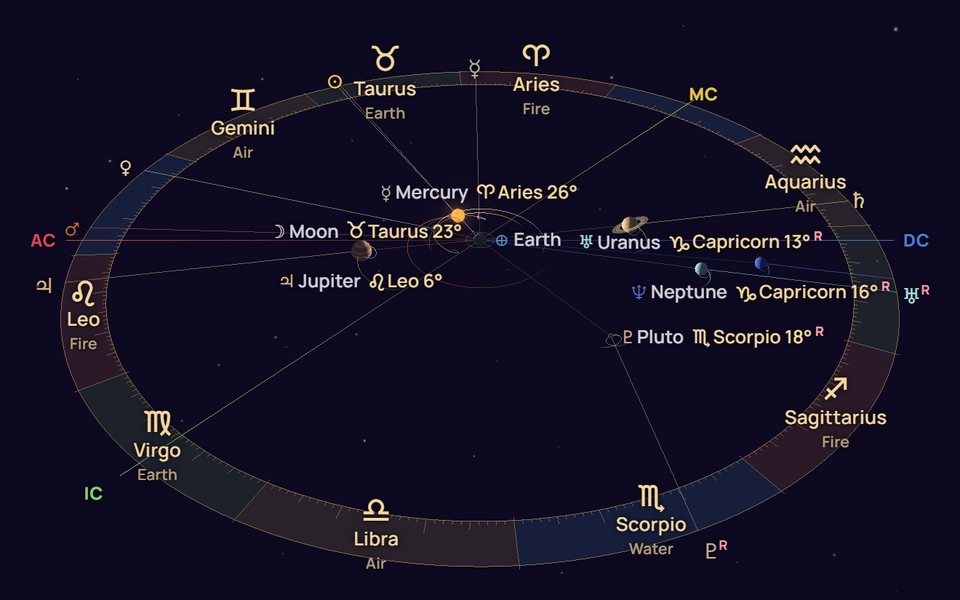
Tap “As it really is” and the Sun moves to the centre to show where the planets actually were. Where they are right now is on the 3D sky map.
How to read your chart in 3D
Twelve signs of 30° each, coloured by element: fire, earth, air, water. The sign shows how a planet expresses itself.
A ray from Earth through a planet points to its sign and degree. Each planet is labelled with its position — just like in the table below the chart.
Red AC is the Ascendant: how you meet the world and how others see you. Yellow MC is your goals and calling. Opposite are DC (partnership, blue) and IC (home and roots, green).
An R means that, seen from Earth, the planet was moving backwards through the zodiac on your birthday. The “?” tour shows how planets draw loops.
- The “?” button — a 30-second tour of what’s on the chart and how to read it
- Mouse or finger to rotate; the wheel (after clicking the chart) or two fingers to zoom
- Tap a planet, sign or star to open its description — what the planet means in your sign
- The circle button — top view, like a chart wheel; “Layers” — what to show
- Change the date, time or place above the chart and it rebuilds
Where to start: Sun, Moon and Ascendant
The Sun is your core and what you live for. The Moon is your feelings and what gives you peace. The Ascendant is how others see you and how you begin new things. These three points are already a portrait; the other planets add detail: Venus is how you love, Mars how you act, Saturn where you need discipline.
A house shows the area of life where a planet works: 1st — yourself, 2nd — money, 7th — partner, 10th — career. Houses and the Ascendant depend on your time and place of birth, so without an exact time there are none. More on the birth chart calculator page.
Frequently asked questions
What is a 3D birth chart?
It’s a regular birth chart shown in three dimensions: Earth at the centre, the planets where they were at the moment of your birth, the zodiac belt around them and the AC and MC axes. The flat chart wheel is a view of this from above. In 3D it’s clear where “Venus in Scorpio” and “Mercury retrograde” come from.
Is it free? Do I need to sign up?
It’s free and needs no account: enter your date, time and place of birth and the chart appears right away. You only need to sign up to save your chart and read the interpretation in Saliastro.
What if I don’t know my birth time?
Tick “unknown” and the chart is built for noon. You’ll see the planets in signs, but without the AC and MC axes or houses, and the Moon may be in the neighbouring sign — it moves about 13° a day.
How is 3D different from a normal birth chart?
Only in the view: the same planets, signs, degrees and houses. The wheel is easier for reading a chart; 3D is for understanding how the sky works — and showing your chart to friends. In your Saliastro account you can switch your chart between “3D” and “2D”.
How accurate is it?
Planets are calculated with the same library as the charts in your account: longitudes match the Swiss Ephemeris to the arcsecond, Chiron comes from NASA JPL tables. Time zones and daylight saving on your birth date are handled automatically. Houses are Placidus. Planet sizes and distances are compressed in 3D so everything fits; the directions are exact.
Is my data sent anywhere?
Your date and time of birth never leave your device — the chart is calculated in your browser. To find your city the site looks up its name in a places directory; nothing else is sent.
Does it work on my phone?
Yes: rotate with one finger, zoom with two, tap a planet for its description. You need a browser with WebGL, which almost every recent phone has.